


Batteries
More nickel, more energy, shorter life: layered NMC cathodes
NMC111, NMC622 and NMC811 side by side: synthesis scheme, voltage profiles, capacity retention and why Ni-rich particles crack.
Open in Research PosterLabCanvas puts figures, slides, posters, 3D scenes, protein views and graphs in one workspace that runs in your browser. Every object is drawn by a generator you can adjust.
Polymers and gels, membranes and porous solids, nanoparticles, cells and viruses, frameworks, batteries, devices, instruments and AI-driven labs, drawn by generators: change a setting and the drawing follows.
 Polymer chain architectures (3D)
 Nanoparticle (3D)
 Graphene sheet
 Polymer architectures: linear to hyperbranched (3D)
 Gold NP, citrate-capped
 Graphene flake
 Copolymer sequences: random, alternating, block, gradient, graft
 Silver NP, phytochemical capping
 Graphene (ball and stick)
 Chain conformations: coil, globule, extended, helix (3D)
 CTAB-capped gold seed
 Doped graphene (N, S, Fe)
 Branched polymer with long-chain branches (3D)
 Magnetite NP (Fe₃O₄)
 Porous graphene
 Star polymer (3D)
 Fe₃O₄@SiO₂ core–shell
 Doped carbon nanosheet
 Animal cell, cut open (3D)
 Porous solids (3D)
 Nanoparticle
 MOF building unit (SBU)
 Graphene
 Animal cell with a wedge cut out (3D)
 Porous solids: six kinds side by side
 Gold nanorod
 Zn₄O cluster with linkers (MOF-5)
 h-BN
h-BN Animal cell cut in half (3D)
 Open-cell foam (3D)
 Nanostar
 Cu paddlewheel (HKUST-1)
 MoS₂
MoS₂ Cell membrane with receptors and channels (3D)
 Bicontinuous porous sponge (3D)
 Core–shell
 Solar cell
 Composite microstructure (3D)
 Electrode crystal
 Robot arm
 Analytical balance
 Transistor (FET)
 Unidirectional composite, hexagonal packing (3D)
 Li₀.₅CoO₂ (half charged)
 Liquid-handling robot
 pH meter
 Battery
 Unidirectional composite, square packing (3D)
 LiCoO₂ with 2D lithium planes
 Pipette
 Centrifuge
 Microfluidic chip
 Glass-fibre composite, GFRP (3D)
 NMC811 (layered)
81 templates of real syntheses, from graphene exfoliation and CVD growth to MOFs, MXenes, Stöber silica and gold nanorods. Each one is drawn with editable layers and cites the papers it follows.
 Four-panel figure (2 × 2)
 Six-panel figure: characterizing gold nanoparticles
 Four-panel figure: battery cathode performance
 Journal cover: single-atom catalysis
 Graphene oxide: synthesis and characterization
 Hummers method: graphite to GO to rGO
 CVD graphene on copper and PMMA transfer
 Green synthesis of silver and gold nanoparticles
 Co-precipitation of magnetite (Fe₃O₄) nanoparticles
 Hydrothermal growth of ZnO nanorod arrays
 MCM-41 mesoporous silica by surfactant templating
 Liposomes by thin-film hydration and extrusion
 Isoreticular MOFs: one net, designed pores
 Post-synthetic modification of a MOF
 MOF-801: water from desert air
 COF linkages: from reversible to robust
 3D COFs: COF-102 and COF-300
 COF-366-Co: cobalt porphyrin COF for CO₂ reduction
 Inside a lithium-ion cell, from can to crystal (3D renders)
 LiFePO₄: the olivine cathode
 The graphite anode: staging and the SEI
 Solid-state batteries: ceramic electrolytes
 The OER mechanism: four proton–electron steps
 CO₂ electrolyzers: gas-diffusion electrodes
 NiFe layered double hydroxides for oxygen evolution
 AlphaFold: a predicted structure and how sure it is
 From coevolution to protein language models
 One large panel and three small (1 + 3)
 Four-panel figure: cell viability and cytotoxicity
 Four-panel figure: a predicted protein structure and its confidence
 Mechanical exfoliation with adhesive tape
 Doped carbon nanosheets from layered biochar
 Improved Hummers method with K₂FeO₄
 Epitaxial graphene on SiC
 Turkevich citrate reduction of gold nanoparticles
 Hydrothermal synthesis of carbon dots
 Sol–gel synthesis of TiO₂ and SiO₂
 MOF synthesis: ZIF-8 and UiO-66
 MOF-5: synthesis and structure
 UiO-66: modulators and missing-linker defects
 Characterizing a new MOF
 Iron MOF nanoparticles for drug delivery
 TpPa COFs: β-ketoenamine links that survive acid and base
 CTF-1: triazine frameworks from molten salt
 COF photocatalysts for hydrogen from water
 How a lithium-ion battery works
 LiMn₂O₄: the spinel cathode
 Silicon anodes: huge capacity, huge swelling
 Making and testing a coin cell
 Single-atom catalysts: one metal atom, four nitrogens
 Fuel cells: oxygen reduction on platinum alloys
 MOF-derived catalysts: from framework to carbon
 Inside AlphaFold 2 and AlphaFold 3
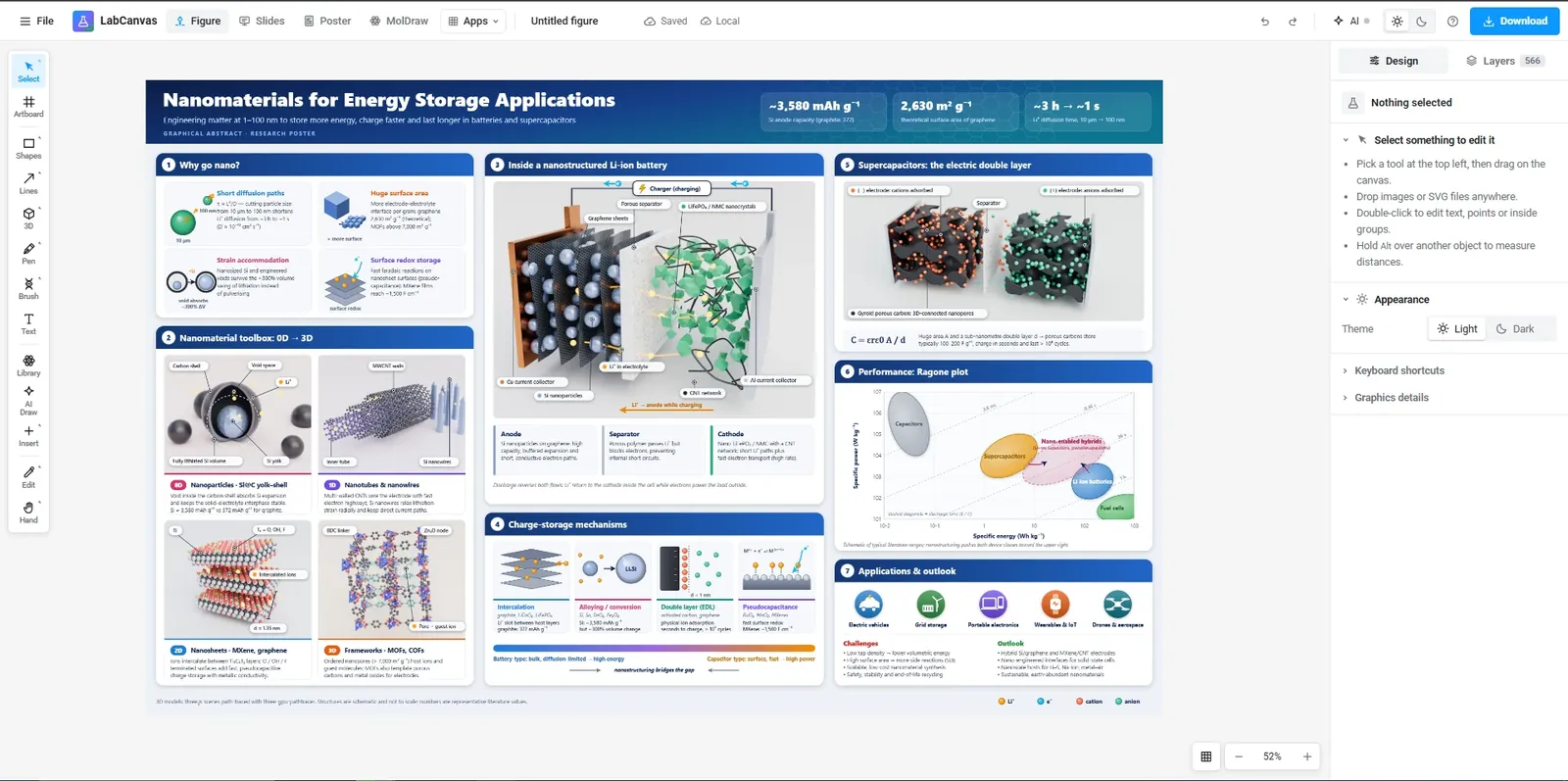
 Nanomaterials for energy storage
 Six-panel figure (3 × 2)
 Four-panel figure: tumour growth and survival in vivo
 Journal cover: genome editing
 Liquid-phase exfoliation of graphite
 Electrochemical exfoliation of graphite
 CVD growth of graphene on copper and nickel
 Graphene on SiC for remote epitaxy and layer transfer
 Seed-mediated growth of gold nanorods
 g-C₃N₄ by thermal polymerization
 Stöber synthesis of monodisperse silica spheres
 MXene (Ti₃C₂Tₓ) by selective etching of Ti₃AlC₂
 HKUST-1: copper paddlewheels and open metal sites
 MIL-101(Cr): supertetrahedra and giant cages
 Mg-MOF-74: open metal sites for CO₂ capture
 COF-1 and COF-5: the first COFs
 COF-LZU1: an imine COF that holds palladium
 Characterizing a 2D COF
 COF thin films for molecular separation
 LiCoO₂: the layered oxide cathode
 Ni-rich NMC: more capacity, less stability
 Lithium–sulfur: a carbon host and the polysulfide shuttle
 Water splitting: hydrogen and oxygen evolution
 CO₂ reduction on copper: many products
 MoS₂ for hydrogen: the edges do the work
 Benchmarking an electrocatalyst
 Protein folding: the energy landscape
 Targeted drug delivery with nanoparticles
Each app does one job well, and everything it makes can go into the others. Open the ones you use as tabs: they all run in the same window.
 Figure editorVector figures with 500+ science objects, equations and journal-ready export.
 Protein viewerAny PDB entry, styled by chain, residue or ligand, snapshotted to your figure.
 3D StudioNanomaterials, viruses, crystals and molecules, ray traced.
 Graphs & statisticsPrism-style tables, tests and graphs that stay linked to your figure.
 MolDrawMolecules and reactions, with a 3D view of the same structure.
 SlidesDecks built on the figure editor, with builds and match-move transitions.
 Research PosterBlocks in columns that re-flow when you move or resize them, from A0 and 48 × 36 in templates.
 OpticsLasers, lenses and fibres on a breadboard, simulated as you build.
 Pixel editorCrop, levels, curves and retouching, in place on the canvas.
Three complete A0 conference posters made in LabCanvas Research Poster: title, introduction, methods, results, conclusions, references and a QR code, with illustrations, molecules and graphs. Open one and it becomes your copy: double-click a graph to change its data, or drag a block to another column and the poster re-flows.
NMC111, NMC622 and NMC811 side by side: synthesis scheme, voltage profiles, capacity retention and why Ni-rich particles crack.
Open in Research PosterA zirconium MOF made with more and more acetic acid: synthesis, PXRD, N₂ isotherms, defect models and linkers counted by TGA.
Open in Research PosterSeed-mediated gold nanorods: growth scheme, UV–vis–NIR spectra, plasmon against aspect ratio and a TEM length histogram.
Open in Research PosterThe main things people make in LabCanvas, and the app that does each one. They run in the same window, so a render, a graph or a photo goes straight into your figure, slides or poster.
Draw figures and graphical abstracts with vector shapes, the pen and scientific brushes for DNA, membranes and proteins. Add any of 500+ science objects and change every detail with a setting.
Build nanomaterials, crystals and devices in the 3D Studio, or bring in molecules from PubChem and proteins from the PDB. Render them ray traced and drop the image into your figure.
Type or paste your data into tables, run t tests, ANOVA and curve fits, and make publication graphs with significance brackets. The results are checked against SciPy and statsmodels.
Crop micrographs and photos, set levels and curves, and retouch dust or scratches in the Pixel workspace, right on your figure, without a separate image editor.
Put your figures on slides with transitions, or lay them out on a research poster that re-flows as you edit. When you submit, export TIFF, PDF, PNG or SVG at the width and resolution the journal asks for.
Membranes, ligands, pores and lattices are parameters, not pixels. Open one in the figure editor, or turn its 3D model in the 3D Studio.
Plus equations, tables, lab glassware and scientific brushes. Browse the gallery, with the 3D models
Describe what you need, or attach a sketch, a figure or a paper. The assistant works through the same actions as the toolbar, in the figure editor, Slides, the 3D Studio and the Protein viewer.
Runs on leading models such as Claude, with monthly AI credits in every LabCanvas Pro plan. No API keys; your chats are saved to your account.
It creates real, editable layers, shows each action in the chat, and one click undoes a whole answer.
97 tools let Claude Desktop, Claude Code and other MCP clients build figures, slides, posters, graphs and 3D scenes in your open apps.
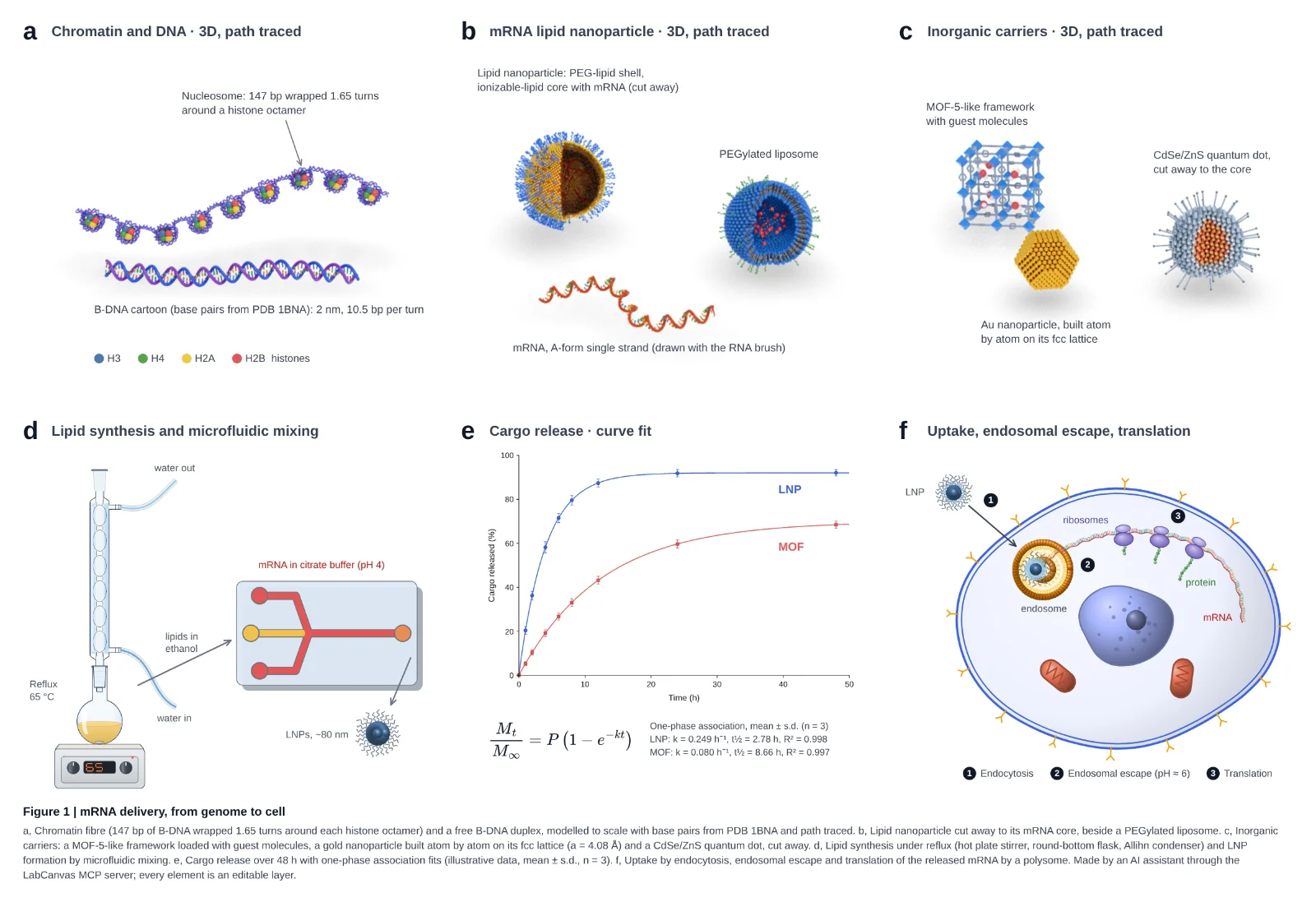
An AI assistant drove LabCanvas through its MCP server: path-traced 3D molecules, glassware assembled joint by joint, a curve fit with its equation and a cell schematic. Every panel is an editable layer.
The details that make a figure acceptable to a journal, handled by the app instead of by you.
Set the width in millimetres and the resolution (300, 600 or 1200 dpi) and export TIFF, PDF, SVG, PNG, JPEG or WebP. Files carry their DPI, so the size is right when the journal opens them.
Liposomes, cancer cells, viruses, nanoparticles, crystals, hydrogels, devices and lab instruments: drawn by generators, so every detail is a setting.
Equations typeset by MathJax into vector outlines, and editable tables with scientific (booktabs) styles.
Flasks, condensers, still heads, adapters, funnels, burettes, stands, hot plates, furnaces and gloveboxes at real proportions. Pieces snap onto each other’s joints and tubing follows them, so a distillation setup stays assembled as you move it.
Import compounds from PubChem and structures from the RCSB PDB; show them as cartoons, surfaces or ball-and-stick.
Prism-style analyses whose results are validated against SciPy, statsmodels and lifelines in 1,472 automated checks.
Drag a block between two others or into another column and the poster re-stacks; resize it and the text re-flows. A0 and 48 × 36 in templates, themes, QR codes and a print-ready vector PDF.
Designs autosave in your browser and, if you choose, to your own private cloud folder so you can open them on any computer. Nothing is public, and nobody else can open your work.
Anything else? Write to our team.
LabCanvas is a browser-based workspace for scientific visuals. It combines a vector figure editor, a presentation maker, a research poster designer, a 3D studio, a protein structure viewer and a graphing and statistics app, with journal-ready export and an AI assistant.
Every app is free to use with an account, with up to 3 designs; downloading and exporting are part of LabCanvas Pro, paid monthly or yearly (see the pricing page for the price in your country). LabCanvas Pro also gives unlimited designs and a monthly allowance of AI credits for the assistant. Choose monthly or yearly and pay securely through Dodo Payments; cancel any time. The website and the free tools at /tools need no account and no payment.
In your browser’s storage (IndexedDB) on your own device, and, with cloud saving on (the default for new designs), in your own private folder in LabCanvas cloud, so they open on any computer. You can switch cloud saving off for any design, and File › Save a copy keeps a portable .labcanvas file.
PNG, JPEG, WebP, TIFF, PDF and SVG. You set the physical width in millimetres and the resolution (for example 300, 600 or 1200 dpi); PNG and TIFF files record their DPI. Presentations export as one vector PDF.
Yes. LabCanvas Research Poster starts from a template (A0 or A1 portrait, 48 × 36 in landscape, a billboard-style #betterposter layout and more) built from blocks: title, sections, figures, a key finding, a big number, references and a QR code. Drag a block to another column or between two others and the columns re-stack; resize it and the text re-flows. Themes restyle every block at once, and the poster exports as a vector PDF at its exact printed size.
Yes. Objects › Equation typesets LaTeX, including AMS environments and chemistry with \ce{…}, into vector outlines that stay sharp in PDF and SVG. Double-click an equation to edit its LaTeX later.
Open the Protein viewer, enter a PDB ID such as 1CRN or 4HHB, pick a style (cartoon, surface, ball-and-stick…) and a colouring, select residues on the sequence bar to highlight or restyle them, then download a PNG or add it to your figure.
The assistant runs on leading models such as Anthropic Claude, chosen and set up by LabCanvas: there is no API key to paste. Each LabCanvas Pro plan includes monthly AI credits; you can attach images and PDFs to your messages, and your chats are saved to your account. The assistant edits through the same actions as the toolbar, so every change can be undone.
LabCanvas includes a Model Context Protocol (MCP) server with 97 tools, so AI agents such as Claude Desktop or Claude Code can create and edit figures, slides, posters, graphs, 3D scenes and optical setups in your open LabCanvas apps.
Yes. The figure editor, Slides, the 3D Studio, the Protein viewer and the Graph app can each be installed from the browser and opened like desktop apps.
How to make journal figures and graphical abstracts in the LabCanvas Figure editor: vector tools, 700+ adjustable science objects, lab glassware that connects, LaTeX equations, and export at the width and DPI your journal asks for.
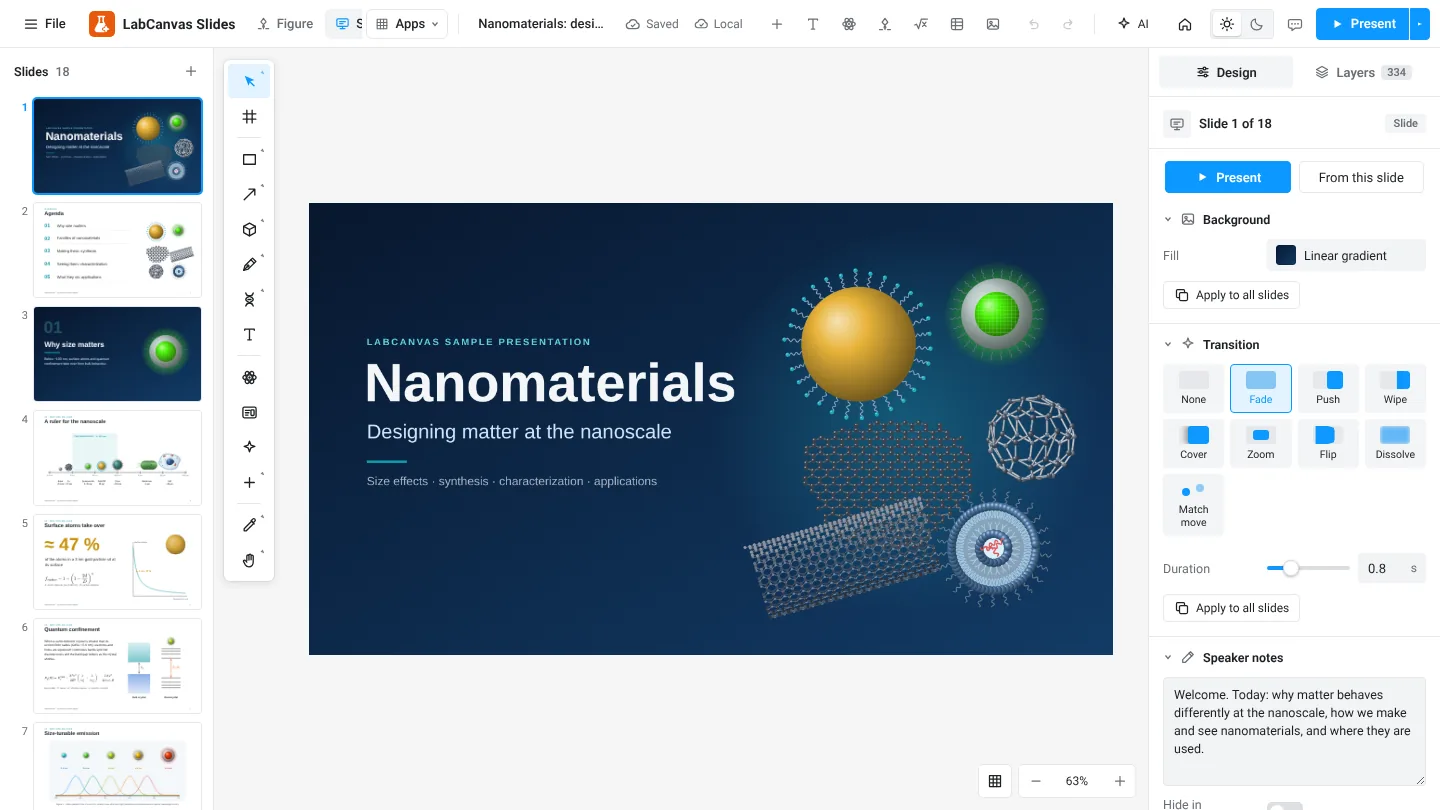
How to build lab meetings, conference talks and lectures in LabCanvas Slides: a slide strip, layouts and themes, transitions and motion paths, speaker notes, full-screen presenting and a vector PDF of the deck.
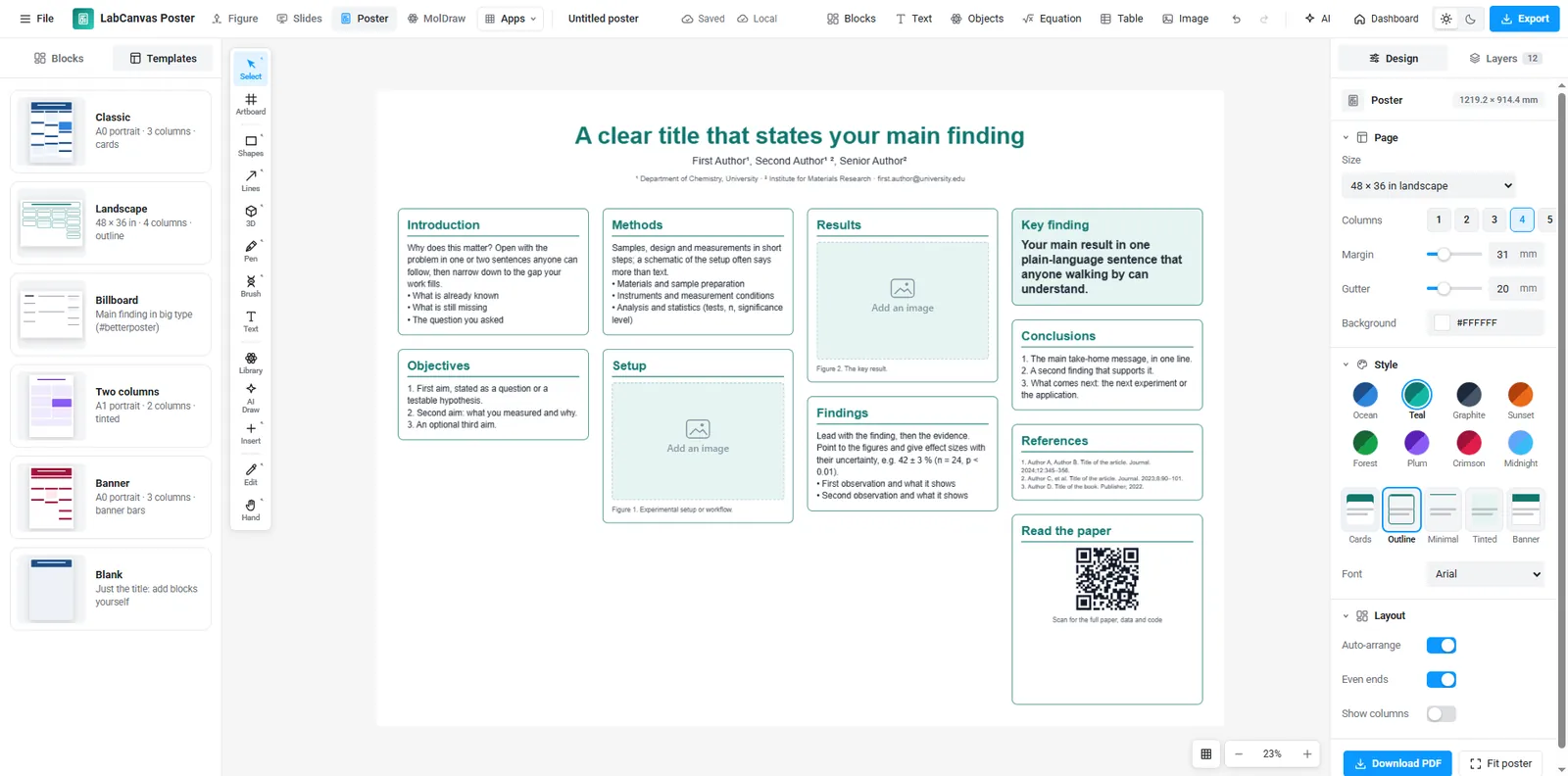
How to make an A0, A1 or 48 × 36 in research poster in LabCanvas Research Poster: blocks that stack in columns and re-flow their text, themes and block styles, QR codes, and a print-ready vector PDF.
Every app is free to start in your browser, with up to 3 designs. LabCanvas Pro adds downloads, unlimited designs and the AI assistant.
Start free See pricing


